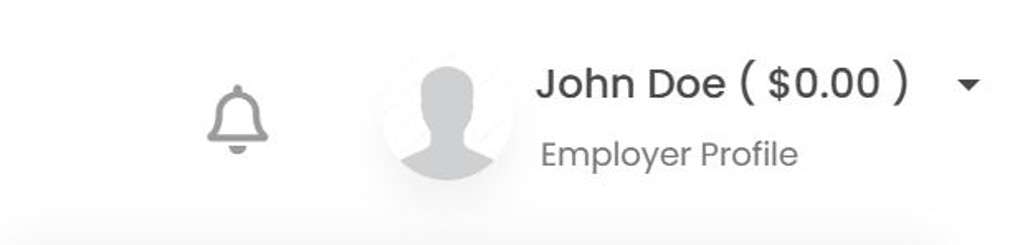
At 3DJOBBER, versatility is key. Users can effortlessly manage dual roles—both as freelancers and employers—within a single account. This unique feature allows you to post services, bid on projects, or upload your own projects, all from the same account. To accommodate the different needs of freelancers and employers, 3DJOBBER provides two distinct profile areas. You can switch between your freelancer and employer profiles with ease by navigating to the top right header area of your dashboard. This flexibility makes it simple to adapt to varying project requirements and opportunities, ensuring a comprehensive and efficient user experience on our platform.

Dashboard Profile Select
Here, you can activate selection between profiles. Find it in the top right header of your dashboard.
Employer:
If you are posting 3D printing projects and looking for freelancers, select employer.
Freelancer:
If you are posting 3D printing services and looking to bid on projects, select freelancer.
Companies and individuals who do both, can toggle between the 2.
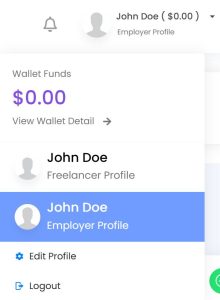
You simply select the correct profile icon from the drop-down. This will open the selected profile.
Your 3DJOBBER account is designed to cater flexibly to both employers and freelancers within the 3D printing community, making it a versatile tool for users who engage in both hiring and freelance work. To facilitate these dual functionalities, the platform features two separate profiles under a single account, each tailored to distinct user roles.
For Freelancers: The freelancer profile is designed to showcase your skills, previous projects, and professional details that highlight your expertise in 3D printing. As a freelancer, your profile should effectively market your services to potential employers. This includes filling out detailed information about your capabilities, uploading a unique cover image, and choosing a profile photo that represents your professional persona. Completing this profile comprehensively ensures that you make a strong impression on potential clients and stand out in a competitive market.
For Employers: The employer profile, on the other hand, is geared towards those who are looking to post projects and hire freelancers. This profile should be completed to reflect the company’s branding and operational focus within the 3D printing industry. It should provide clear information about the types of projects you are posting and the specific skills you are seeking from freelancers. Just like the freelancer profile, the employer section should have a unique cover image and profile photo to enhance visibility and attract the right talent.
Managing Dual Roles: For users who handle both roles, 3DJOBBER allows you to manage these profiles independently. Each profile area must be completed separately, ensuring that all information, from biographical details to gallery photos, is relevant to the specific role. This dual setup allows companies that both hire freelancers and undertake freelance work themselves to maintain distinct identities for each function.
Completing Your Profiles: When filling out each profile, take your time to ensure that all sections are thorough and thoughtfully presented. Remember, these profiles are often your first point of contact with potential clients or freelancers, making them a critical component of your professional image on the platform.
By utilizing these unique profile features effectively, you can maximize your engagements and opportunities on 3DJOBBER, whether you are seeking to hire skilled professionals or looking to get hired for your 3D printing expertise.
Once you’ve carefully completed your profiles on 3DJOBBER, whether as an employer or a freelancer, you’re ready to start engaging with the platform’s core functionalities: posting projects and services.
For Employers: If you’re using 3DJOBBER as an employer, the next step is to post your 3D printing projects. This involves detailing the project specifications, including the scope of work, materials required, deadlines, and budget. Ensure that your project description is clear and comprehensive to attract qualified freelancers. It’s also beneficial to mention any specific skills or experience you require. This clarity helps in receiving proposals that closely match your project needs, making the selection process smoother and more effective.
For Freelancers: As a freelancer, your focus should be on listing the 3D printing services you offer. This includes describing the types of printing technologies you specialize in, the range of materials you work with, and any particular sector expertise you might have (such as automotive parts, architectural models, or artistic sculptures). Highlighting past successful projects can significantly enhance your profile. Be sure to set clear expectations regarding timelines, pricing, and any unique selling points of your service to attract potential employers.
Maximizing Platform Use: Both employers and freelancers should utilize the tools and features provided by 3DJOBBER to manage their postings effectively. Employers can track proposals, communicate with freelancers, and manage project timelines all within the platform. Similarly, freelancers can use the platform to respond to project postings, showcase their portfolio, and negotiate contract terms.
By actively posting projects or services, users can fully leverage 3DJOBBER to create valuable connections, foster professional relationships, and drive their 3D printing projects or services towards success. Whether you are seeking to expand your business, explore new creative avenues, or build your professional network, 3DJOBBER provides the resources and environment to achieve your goals.
Freelancer Posting Services
From the dashboard header area, click Post Services.

When you’re ready to list your services on 3DJOBBER, ensuring a comprehensive and appealing presentation is key to attracting potential clients. Here’s a step-by-step guide to posting your service effectively:
By following these steps, you can create a compelling and detailed service listing on 3DJOBBER that not only attracts attention but also convinces potential clients of your capability to handle their 3D printing needs effectively.
After Completing Service, Don’t Forget To Dave It!
Employer Create Projects
From the dashboard header area, click Create Projects. 

When you’re ready to post a project on 3DJOBBER, taking the time to craft a detailed and appealing project listing is crucial for attracting the best freelancers. Here’s a comprehensive guide to help you create an effective project post:
Open the Project Area: After selecting the ‘Post Project’ option, the project submission area will open. This is where you can start the process of listing your project.
Complete All Required Fields: Fill out every section provided in the form thoroughly. Missing information can lead to a lack of interest from qualified freelancers or miscommunication about the project requirements.
Upload Images: Including visuals with your project listing can significantly enhance its appeal. Add high-quality images that are relevant to the project, such as sketches, blueprints, or reference photos. Images help freelancers better understand the scope and requirements of the project.
Write a Detailed Description: In the description area, provide a comprehensive and precise explanation of what the project entails. Detail the objectives, the scope of work, any specific skills required, and the expected deliverables. The more detailed your description, the easier it is for freelancers to assess their suitability for the project.
Set the Budget/Cost: Enter your budget for the project as a whole number without any decimals. Be realistic and fair based on the scope of work and the expertise required. A clear and reasonable budget will attract more serious and professional freelancers.
Flexibility to Edit: Remember, after posting your project, you can return at any time to make adjustments. Whether it’s refining the project details, updating the budget, or improving the images based on the interest or feedback received, editing your post can help maintain its relevance and attractiveness.
By following these steps, you can ensure that your project post on 3DJOBBER is not only comprehensive but also appealing to top-tier freelancers. A well-documented project listing will help you attract the right talent and ensure that your project goals are met effectively and efficiently.
After Completing Project, Don’t Forget To Dave It!

Your one-stop 3D Printing recourse to post 3D printing projects for the best 3D freelance printing services. Get the latest 3D printing techniques and information.
Copyright 2023 © 3DJobber ROI Inc. All Rights Reserved. What Is 3D Printing